CONTRACT MANAGEMENT:
The contracts are sent from SAP to PRM360 system. The admin or the user cannot edit any fields in the contract. They can only view.
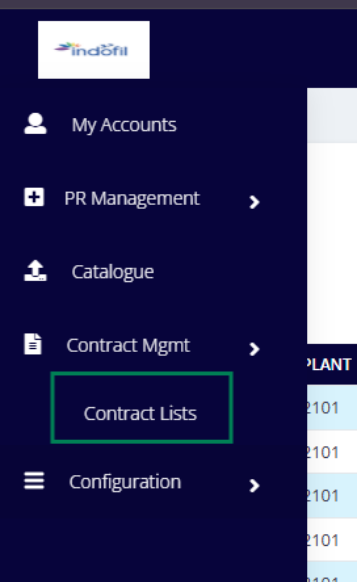
1. Filter Region: Used to narrow down contracts based on specific criteria.
Contract Number: Filter contracts using the system-generated contract number.
Vendor Code: Filters contracts linked to a specific vendor.
Material Code / Description: Filter contracts based on material code or material description.
Purchase Origination: Filters contracts by purchase organization.
Plant: Displays contracts applicable to a specific plant.
Status: Filter by contract status (e.g., Active, Expired, Closed).
Purchase Group: Filters contracts based on the responsible purchase group.
Created By: Filters contracts created by a specific user.
From Date / To Date: Filters contracts based on creation date range.
Apply: Applies selected filters.
Search: Free-text search to quickly locate a contract or material.
2. Contract List Table – Column Explanation
Actions- View (?): View detailed contract information.
Contract No: Unique contract number generated by the system or SAP.
Line: Contract line-item number. A single contract can have multiple material lines.
Start Time: Contract validity of start date. The contract can be utilized only after this date.
End Time: Contract validity end date. After this date, the contract becomes inactive or expired.
Vendor Name: Name of the vendor associated with the contract.
Vendor Code Unique vendor identifier in the system/SAP.
Material Code: Unique code of the material covered under the contract.
Material Description: Description of the material or service.
Plant: Plant(s) where the contract is applicable.
Purchase Organization: Purchase organization responsible for the contract.
Purchase Group: Purchase group managing the contract.
Quantity: Total contracted quantity for the material.
Available Qty: Remaining quantity available for procurement. Reduced as PRs/POs are created against the contract.
Unit Price (Currency): Agreed unit price as per contract. Displayed with currency. Price is typically exclusive of taxes unless stated.
Status: Current status of the contract.
Date Created: Date and time when the contract was created in the system.
Remaining Days: Number of days left before the contract expires. Helps procurement teams proactively renew or close contracts.
View Contract:
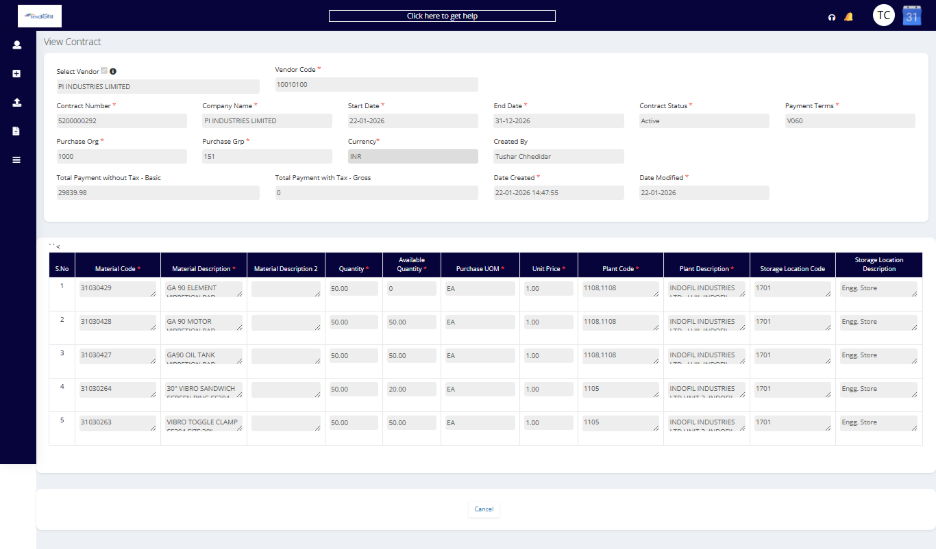
To view the contract. The user needs to click on the view button then it will redirect to the page below which consists of all the contract information along with the items.
Was this article helpful?
That’s Great!
Thank you for your feedback
Sorry! We couldn't be helpful
Thank you for your feedback
Feedback sent
We appreciate your effort and will try to fix the article