PR Management:
Based on Location, plant, material type, and origin the PRs flow from SAP to PRM. As the system doesn’t give the option to create PR directly from UI, PR will be
auto-sourced from Emami ERP to the PRM portal via integration.
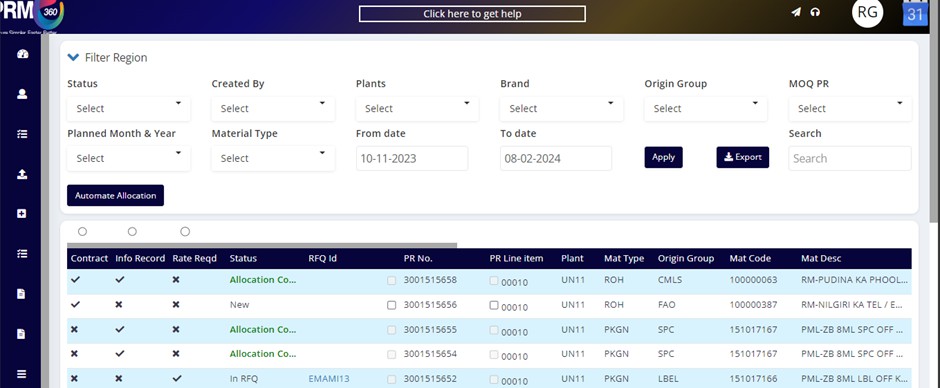
PRs can be of two types
Based on the MOQ (Minimum Order Quantity) status there are two types of PRs present on the screen.
- If the MOQ status is YES - then the planning user (Who has planning user access) has to give the planning status for that particular PR to make sure to the user that the PR is for allocation/RFQ.
- If the MOQ status is NO - then the user doesn’t need to perform any other activity to make that PR ready for allocation or RFQ.
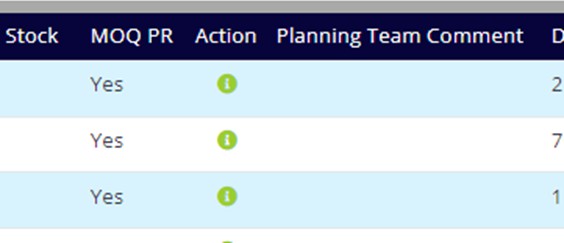 |
Planning status can be of three types -
- Go with MOQ
- Go with the Revised
- No Procurement
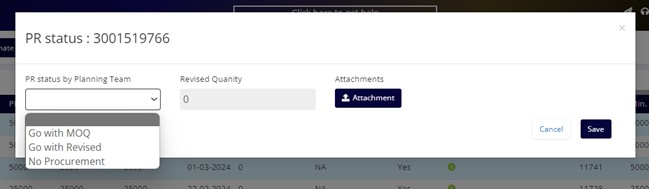 |
Users can select the status for a particular PR which is of MOQ PR as “YES”
- If the user goes with “GO WITH MOQ” then the system will not change the required QTY
- If the user goes with “GO WITH REVISED” then the system will allow the user to reduce qty to less than the required QTY and process further
- If the user goes with “NO PROCUREMENT” then the system will restrict all the downstream activities for that particular PR
This planning status is not allowed to change once it is given.
Each PR comes with “Plant”, Material Type, and “Origin Group” attached to it and the PR will be displayed to the sub-user according to these parameters, only the sub-user who has all three parameters matched will be able to see that particular PR.
There is a field called “Deletion indicator”, if any PR comes with a deletion indicator as YES, then in PRM system will restrict all the downstream activities for that particular PR.
There are three QTY fields “PR QTY”, “SAP OPEN QTY” and “PRM OPEN QTY”
PR QTY field consists of the required QTY value
SAP OPEN QTY field is something that displays the value of OPEN qty in SAP
PRM OPEN QTY field is where the system shows the open qty value which can be used in the PRM portal
There is also a bell icon under actions, which is used to notify the planning user if any PR is of MOQ PR as YES and still, there is no status updated and that PR is on the priority list to go for allocation.
PR Management page PR has 4 different kinds of status
- NEW
- PENDING ALLOCATION
- IN RFQ
- ALLOCATION COMPLETED
If any PR has been newly created and NO action has been performed will be treated as NEW
If a PR has allocation or PO got created for partial QTY then that PR will have “Pending Allocation” status.
If a PR is used for RFQ or if that PR is still in RFQ and no contract or INFO has been created for that RFQ then the PR will have “IN RFQ” status
If a PR QTY has been completely utilized for allocation that PR has “Allocation Completed “status.
PR Filter
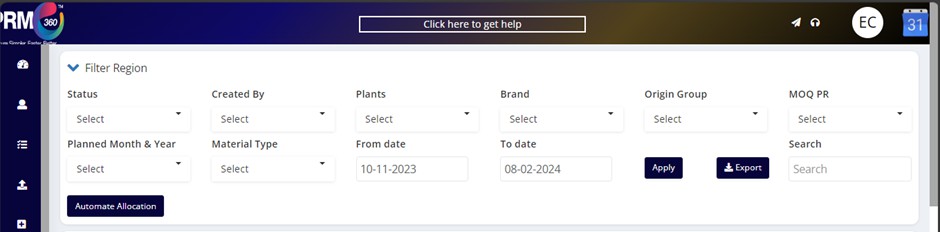
Here all the filters are available on the PR management page and the user can select and see data accordingly
Users can type the PR number in a search filter to get the data of that PR.
In the PR Management screen, users can access three primary selections: Contracts, Info Records, and Rate Required. Depending on the selection made, PRs associated with the selections will be visible.
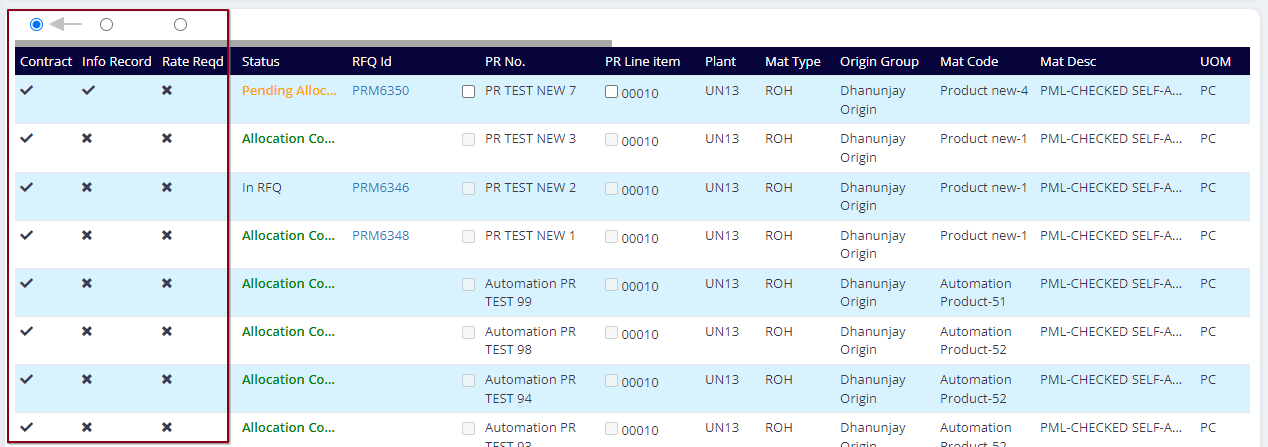 |
If a PR has both Contracts and Info Records there will be a tick mark for both fields. Find the reference below
Was this article helpful?
That’s Great!
Thank you for your feedback
Sorry! We couldn't be helpful
Thank you for your feedback
Feedback sent
We appreciate your effort and will try to fix the article