Using the above URL, the admin and the user will be able to login to the system by entering their Login ID and Password.
Login ID: Registered email ID
Example: indofil@gmail.com
Password: Set by the administrator. It may be numeric, alphanumeric, or alphabetic.
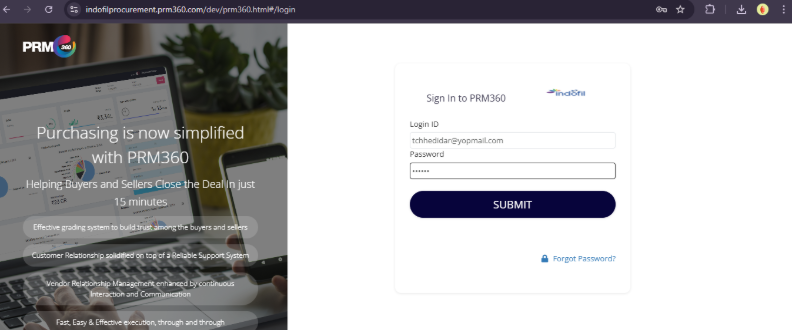
Once the admin enters the login ID and password, they need to click Submit. Then the user will be routed to my accounts page.
Forget Password:
The admin has the option to retrieve their password if they forget it by using the option available on the login page.
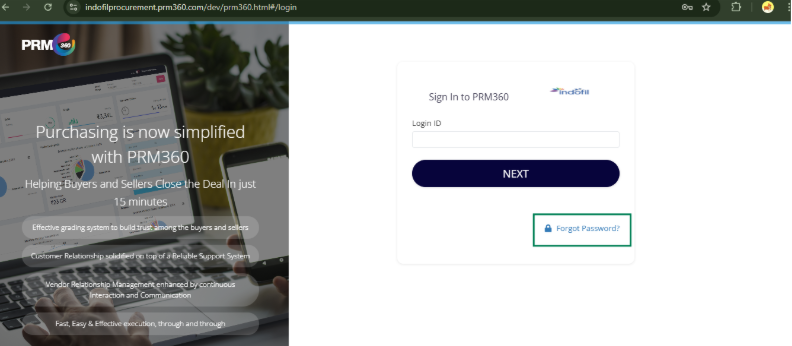
Once the Admin clicks on Forgot Password, they will be redirected to a page where they need to reset the password by entering their registered email ID.
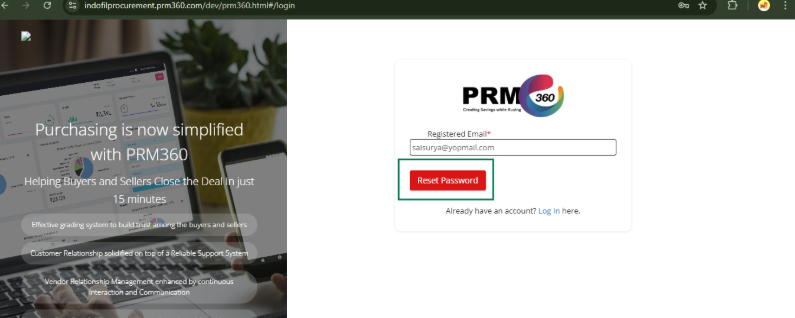
A seven-digit code will be sent to the user’s registered email ID.
Email content: New Password (7-digit code) For PRM360 is 5593153
Using this seven-digit code as the password, the admin can log in with the registered email ID as the Login ID.
Was this article helpful?
That’s Great!
Thank you for your feedback
Sorry! We couldn't be helpful
Thank you for your feedback
Feedback sent
We appreciate your effort and will try to fix the article