MY ACCOUNTS:
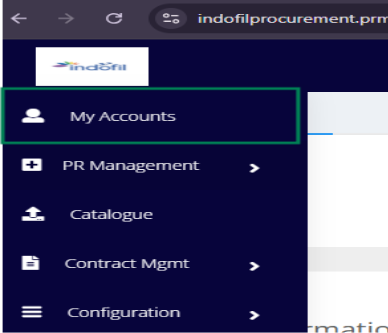
Once the Admin clicks on My Account, they will be redirected to a page that contains About, Sub users, Password Management, Departments, Designations, and Currency.
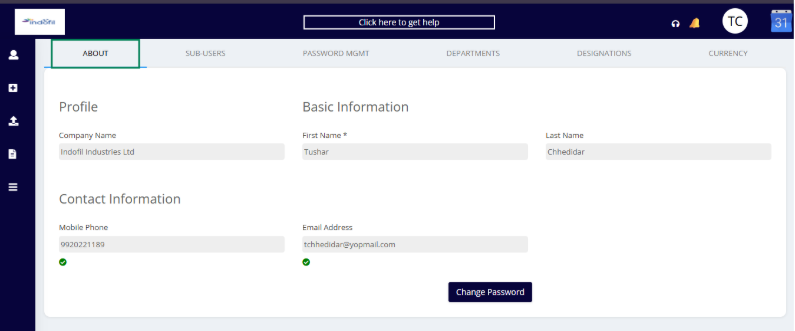
ABOUT:
The About section contains personal and company information, as outlined below:
Profile:
Company Name: Indofil Industries Ltd.
First Name: First name of the user
Last Name: Last name of the user
Contact Information:
Mobile No.: Registered phone number
Email Address: Registered email ID
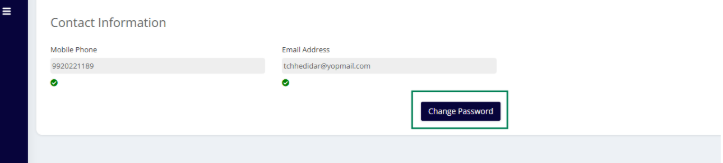
The admin hasve an option to change their password from the about the option available.
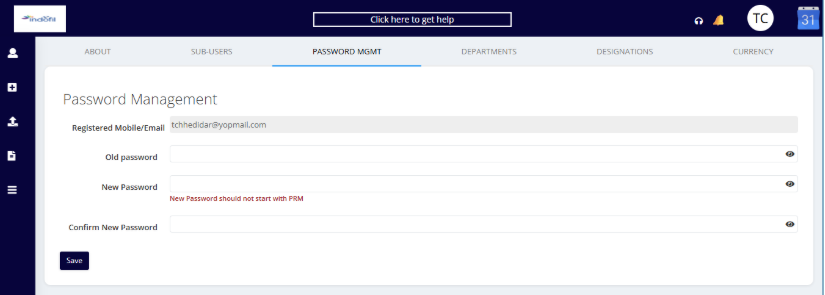
PASSWORD MANAGEMENT:
Old Password
Input field where the user enters their current password.
The eye icon next to the field lets the user toggle the visibility of the entered password for easier input.
New Password
Input field where the user enters the new password they want to set.
There is a specific rule mentioned below in this field:
"New Password should not start with PRM" — meaning the new password cannot begin with the characters "PRM".
The eye icon allows toggling visibility of the new password entry.
Confirm New Password
Re-enter the new password to ensure it is typed correctly.
Must match the "New Password" field exactly.
The eye icon also toggles visibility here.
Save Button
Clicking this will save the new password if all the fields are correctly filled and validated.
Was this article helpful?
That’s Great!
Thank you for your feedback
Sorry! We couldn't be helpful
Thank you for your feedback
Feedback sent
We appreciate your effort and will try to fix the article