MASTERS:
Once the user clicks on the master's, it will route to the page below which consists of purchase organization, purchase group, plant, and document type.
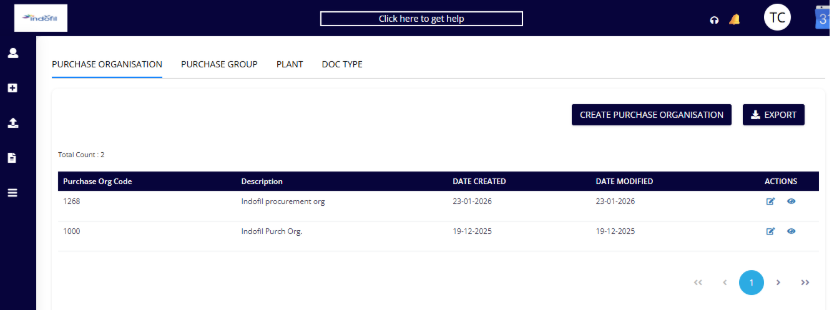
PURCHASE ORGANISATION:
Master data for purchase organizations.
Create Purchase Organization: Used to create a new purchase organization in the system.
Purchase Organization Code
Mandatory field.
Unique code assigned to the Purchase Organization.
This code is used across procurement transactions and SAP integration.
Once created, this code is typically not editable.
Description
Mandatory field.
Descriptive name of the Purchase Organization.
Helps users easily identify the organization during transactions.
Exports: To export the list of purchase organizations to Excel for reporting or audit purposes.
Purchase Organization list:
Description Name or description of the purchase organization.
Date Created: Date on which the purchase organization was created in the system.
Date Modified: Date on which the purchase organization was last updated.
Actions
Edit: Allows modification of the purchase organization's details.
View: Allows viewing the purchase organization details in read-only mode.
Was this article helpful?
That’s Great!
Thank you for your feedback
Sorry! We couldn't be helpful
Thank you for your feedback
Feedback sent
We appreciate your effort and will try to fix the article