Contract List:
The below screenshot represents the contract list page.
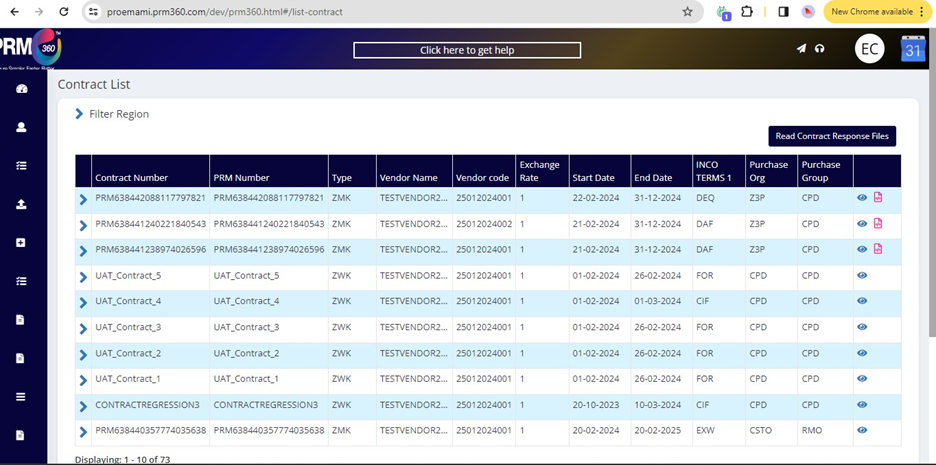
In Emami, the user can get a contract in two ways
- Getting data from ERP to PRM
- Creating a new contract from RFQ > QCS>Contact creation.
In Emami, contracts will be created based on vendor material along with Plant combination.
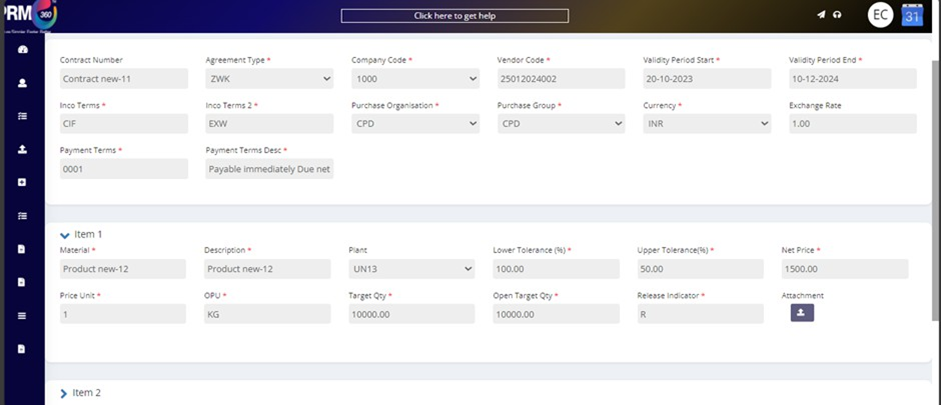
In Emami contracts have price details, Validity period, and also total quantity fields which have their validation, for example, price details will be used in PO creation, when the user is creating PO with that contract then under net price system will be displaying price which is mentioned in that contract and regarding validity period system will restrict the user in using the contract if the “Validity To” has date lesser than current date then it will be treated as an invalid contract and cannot be used in Allocation page.
Here compared to PR even contracts will have three qty fields, Total qty, SAP open qty, and PRM open qty, which has the same functionality concerning PR.
Under one contract users can have multiple line items, items can be of different plants, or the same plant and items can be to different vendors or the same vendors.
The below one is the contract view page.
Was this article helpful?
That’s Great!
Thank you for your feedback
Sorry! We couldn't be helpful
Thank you for your feedback
Feedback sent
We appreciate your effort and will try to fix the article