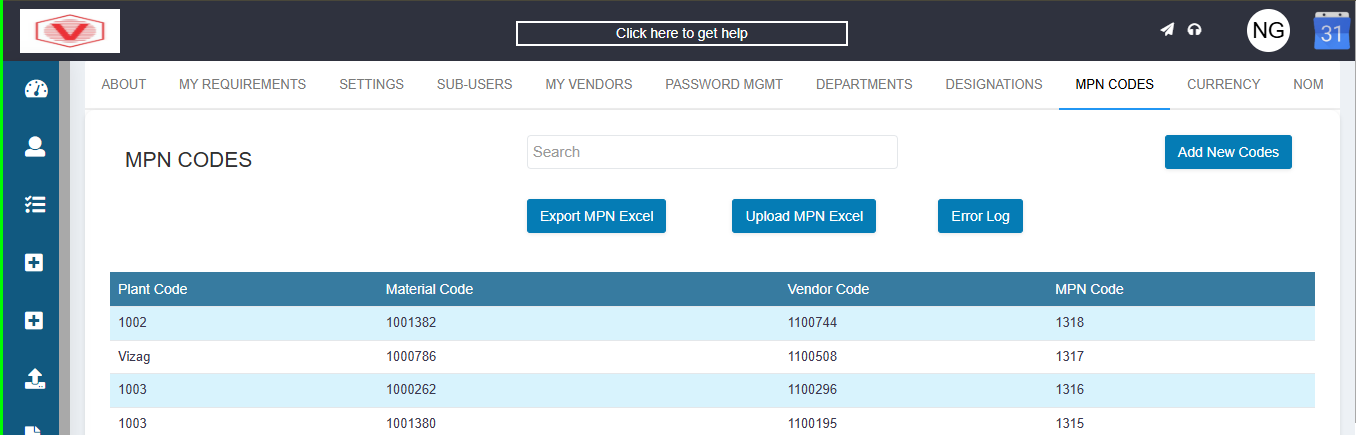
Search
Allows you to search MPN records using keywords such as Plant Code, Material Code, Vendor Code, or MPN Code.
Add New Codes: Used to manually add a new MPN mapping into the system.
Export MPN Excel: Downloads all MPN mappings in Excel format for review, reporting, or offline editing.
Upload MPN Excel: Used to bulk upload MPN mappings by importing an Excel file.
Error Log: Displays errors that occurred during MPN Excel uploads (e.g., invalid codes, missing data, duplicates).
Table Fields
Plant Code: Identifies the manufacturing plant or location.
Can be numeric or plant name depending on configuration.
Material Code: The internal material/item code used in the ERP/system.
This is the key reference for inventory and procurement.
Vendor Code: The unique identifier of the supplier/vendor.
MPN Code
Manufacturer Part Number provided by the vendor/manufacturer.
Used for:
Accurate material identification
Vendor-specific part tracking
Avoiding duplicate or incorrect items
MPN code creation:
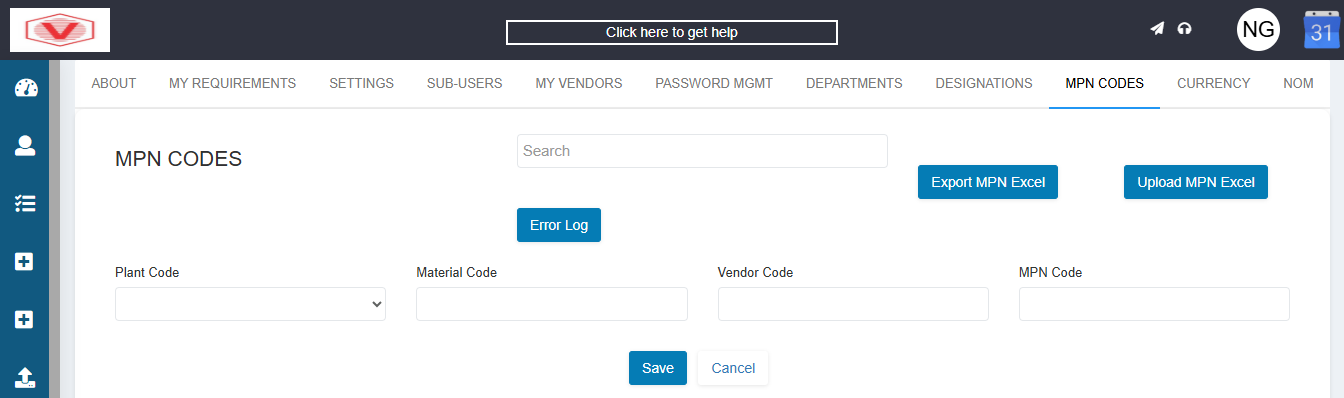
Plant Code – Identifies the plant/location.
Material Code – Unique code assigned to the raw material in the system.
Vendor Code – Unique code assigned to the approved vendor.
MPN Code – Manufacturer Part Number.
It is a unique number created for a specific combination of a raw material and its approved vendor.
If an MPN code is not created for a raw material–vendor combination, the system will not allow the buyer to assign any quantity to that vendor while editing the QCS.